Forza Horizon 6 plays well on a controller, but if you want to give the game a go on your steering wheel, here are some tips to setting up your controls.
Of course, Forza Horizon 6 is a controller game first and foremost. With it being a flagship title for the Xbox Series X|S consoles, that hardly comes as a surprise. But, as @Michel Wolk found out in his preview in April, FH6 also works well on a steering wheel.
There are plenty of settings and options to set up your sim racing hardware, but it is possible to have an enjoyable experience using a wheel and pedals in the game. Here are a few tips to get your started and the list of compatible wheels, as given by the Forza Support Team.
Forza Horizon 6 Compatible Wheels
BrandModelXboxPCNotesFanatecPodium DD2x (with Xbox-compatible wheel)xFanatecPodium DD1x (with Xbox-compatible wheel)xFanatecGT DD Extremepartially, with Xbox-compatible wheelpartiallyAdditional support coming in updateFanatecGT DD Prox (with Xbox-compatible wheel)xFanatecCSL DDx (with Xbox-compatible wheel)xFanatecClubSport DD+partially, with Xbox-compatible wheelpartiallyAdditional support coming in updateFanatecCSL Elite (PS4)x (with Xbox-compatible wheel)xFanatecCSL Elitex (with Xbox-compatible wheel)xFanatecClubSport V2/V2.5x (with Xbox-compatible wheel)xFanatecClubsport V1-xFanatecCSRx (Legacy Support)x (Legacy Support)HORIForce Feedback DLXxxHORIOverdrive SeriesxxHORIAPEX-partiallyAdditional support coming in updateHORIOverdrive Xbox OnexxLogitechG PRO (Xbox version)xxLogitechRS50xxLogitechG923 (Xbox version)xxLogitechG920xxLogitechG29-xLogitechG27-xLegacy supportLogitechG25-xLegacy supportLogitechDriving Force GT-xLegacy supportLogitechMomo-xLegacy supportMad CatzPro Racing Force FeedbackxxLegacy supportMOZAR21-partiallyAdditional support coming in updateMOZAR16-partiallyAdditional support coming in updateMOZAR12-partiallyAdditional support coming in updateMOZAR9-partiallyAdditional support coming in updateMOZAR5-partiallyAdditional support coming in updateMOZAR3partiallypartiallyAdditional support coming in updateRevosimRS PUREpartiallypartiallyAdditional support coming in updateThrustmasterT98 Ferrari 296 GTSpartiallypartiallyAdditional support coming in updateThrustmasterT98 Ferrari 296 GTB-partiallyAdditional support coming in updateThrustmasterT598partiallypartiallyAdditional support coming in updateThrustmasterT248xxThrustmasterT128partiallypartiallyAdditional support coming in updateThrustmasterT-GT II-partiallyAdditional support coming in updateThrustmasterTS-XWxxThrustmasterT-GT-xThrustmasterTS-PC-xThrustmasterTMX Force FeedbackxxThrustmasterT150 RSxxThrustmasterT300 RS-xThrustmasterFerrari 458 Spiderx-ThrustmasterTX Racing WheelxxIncludes 458, Leather, 599XX, F1 & GTE versionsThrustmasterT500 RS-xTurtle BeachVelocityOne Race KD3partiallypartiallyAdditional support coming in updateTurtle BeachVelocityOne RacepartiallypartiallyAdditional support coming in updateTurtle BeachRacer WirelesspartiallypartiallyAdditional support coming in updateSource: Official FH6 support forum.
Forza Horizon 6 Wheel Settings: Turn Down That FFB
As we noticed during our review, not all wheelbases will have Force Feedback out of the box. Michel's Simucube 3, for instance, did not, whereas my Fanatec DD2 did - both devices were recognized as steering axis without issue, though.
Either way, before you try if your wheel actually gets FFB fed to it by the game, make sure to turn down the Force Feedback Scale Slider. I cannot stress this enough; in its default position of 1.0, it can cause injury on a direct drive wheelbase, especially ones with high peak torque outputs! I was lucky I only touched my wheel rim loosely with my palms when trying to see if there was FFB, as it snapped around violently and without warning.
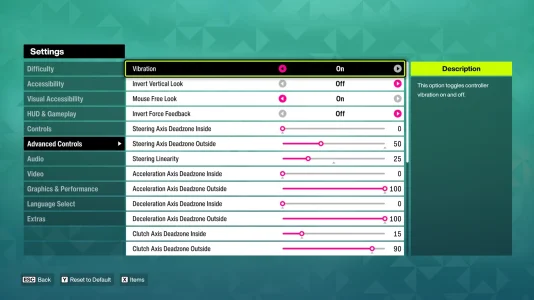
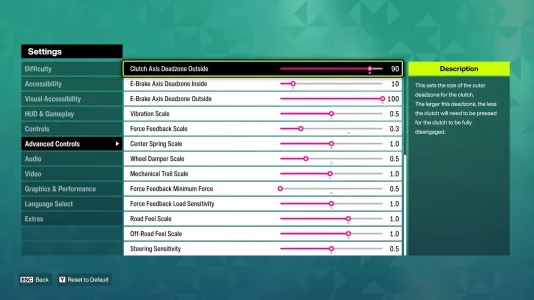
The settings I found to be working well on my Fanatec DD2 - click on an image to enlarge!
Once that slider corresponds - roughly - to the FFB percentage you run in other titles as well, your main objective will be to match the wheel rotation to that of the virtual car as closely as possible, as the usable radius is extremely small by default. To achieve this, you want to focus on the following settings:
- Steering Axis Deadzone Outside (Default: 100): 60 or lower
- Steering Linearity (Default: 50): 25
These two settings alone can transform the way your steering aligns. Lowering the Wheel Damper Scale can also help with getting rid of a heavy feeling in the center, and turning down the Force Feedback Minimum Force slider makes things more pleasant on a DD wheel as well.
Forza Horizon 6: Compatible Wheels Not Announced Yet
Unfortunately, Playground Games and Xbox Game Studios have not yet announced a list of compatible wheels for Forza Horizon 6 at the time of writing this article. Until they do, setting up your wheel might be a matter of trial and error. In Forza Horizon 5, players made many combinations work by using EmuWheel and Vjoy to "simulate" a single device for all of their setup - which might be the way to go for some setups in FH6, too.
Are you looking forward to giving Forza Horizon 6 a try on your wheel and pedals? Let us know in the comments below and join the discussion in our Horizon forum!